[cut="Установка Autorun"]Для работы рекомендуется установить последнюю версию плагина. На данный момент это 2.2.21.3 (15.10.2025)
Инструкция по установке плагина
https://total.darkhost.ru/wiki/doku.php?id=ru:autorun
Особенности последней версии. Для версии 2.2.21.3 нет полного архива с дополнительными модулями (субплагинами) и файлами справки, установку придется проводить в два этапа. Сначала нужно установить версию 2.2.21 от 28.09.2025
https://total.darkhost.ru/files/autorun ... 1_beta.zip
Поверх неё накатить последний модуль от 15.10.2025
https://total.darkhost.ru/files/temp/au ... 251015.zip[/cut]
[cut="Установка MediaInfo"]Для работы требуются библиотеки MediaInfo.dll обеих разрядностей и файл руссификации ru.csv. Библиотеки могут находиться в любом каталоге, путь к ним указывается в заголовке модуля. Дополнительно можно указать путь к утилите ExifTool для смены подсказки по Alt+F12
https://mediaarea.net/en/MediaInfo/Download/Windows
https://exiftool.org/[/cut]
[cut="MediaInfo.aucfg"]
Код: Выделить всё
Pragma IncludeOnce

# Alt+F12
SetHotkeyAction /K:A /H:F12 SetHintFields

# Alt+1(..5)
SetHotkeyAction /K:A /H:1 /DM /S ShowPipeEx 0 1
SetHotkeyAction /K:A /H:2 /DM /S ShowPipeEx 0 2
SetHotkeyAction /K:A /H:3 /DM /S ShowPipeEx 0 3
SetHotkeyAction /K:A /H:4 /DM /S ShowPipeEx 0 4
SetHotkeyAction /K:A /H:5 /DM /S LeftsideHintType

# Win+CapsLock
SetHotkeyAction /V:20 /K:W MediaHintType

# путь к библиотеке MediaInfo
Global gMediaInfoX32 = COMMANDER_PATH & "\Ini\Tools\MediaInfo_i386.dll"
Global gMediaInfoX64 = COMMANDER_PATH & "\Ini\Tools\MediaInfo.dll"

# путь к утилите ExifTool
Global gMediaExifX32 = COMMANDER_PATH & "\Ini\Tools\exiftool.exe"

Global gHintPipe     =   "", _
       gHintClipb    =   true, _
       gHintLines    =   60, _
       gHintWait     =   0, _
       gHintShift    =   "duration.txt", _
       gHintCaps     =   true

Global gHintWdx      =   0, _
       gHintWdxList  =   List(), _
       gHintWdxCfg   =   COMMANDER_PATH & "\Ini\WdxHint.cfg"

Global gHintLayout   =   List(10, 75, 15), _
       gHintContent  =   List("size.txt", "Inform", "hint.txt"), _
       gHintSleep    =   List(0, 0, 0)
#{
       gHintCaps     =   false
       gHintLayout   =   List(15, 70, 15)
       gHintContent  =   List("Inform", "", "duration.txt")

       gHintLayout   =   List(10, 80, 10)
       gHintContent  =   List("size.txt", "hint.txt", "Inform")
       gHintSleep    =   List(0, 0, 0)
#}

Func MediaHint(FileName, FieldIndex, UnitIndex)
    If FieldIndex > gHintLines Then Return
    If StrPos(FileGetAttr(FileName), "D") Then Return ""
    Local bCaps = DllCall("GetKeyState", "int", 0x14, "short")
    Local bCtrl = BitAND(bCaps, 1), bShift = IsPressed(0x10)

    If gHintWdx Then bShift = true
    If Not bCtrl then bCtrl = IsPressed (0x11)
    If gHintCaps And Not bCtrl Then Return

    Static sLib = auX64 ? gMediaInfoX64 : gMediaInfoX32
    Static hLib = DllCall("LoadLibrary", "Wstr", sLib, "Ptr")

    Static sPath = FileGetDir(sLib) & "\"
    Static sLang ="file://" & sPath & "ru.csv", _
           sHint ="file://" & sPath & "hint.txt", _
           sSize ="file://" & sPath & "size.txt"

    Static bLang = true, nWait = 0, _
           pNew, pOpen, pDel, pOpt, pInfo

    If hLib = 0 And FieldIndex > 1 Then Return

    If FieldIndex = 1 Then

       If hLib = 0 Then Return "Error LoadLibrary " & sLib

       Idx = 0
       pNew = DllCall("GetProcAddress", "Ptr", hLib, "Str", "MediaInfo_New", "Ptr")
       pOpen = DllCall("GetProcAddress", "Ptr", hLib, "Str", "MediaInfo_Open", "Ptr")
       pDel = DllCall("GetProcAddress", "Ptr", hLib, "Str", "MediaInfo_Delete", "Ptr")
       pOpt = DllCall("GetProcAddress", "Ptr", hLib, "Str", "MediaInfo_Option", "Ptr")
       pInfo = DllCall("GetProcAddress", "Ptr", hLib, "Str", "MediaInfo_Inform", "Ptr")
       nWait = 0
       bLang = true
       sMode = "Inform"
       If gHintWait > 0 Then Sleep(gHintWait)

       Local x, y, w, nCase = 0
       Local hWnd = RequestInfo(ItemAtCursor("panel"))
       WinGetPos("", "", "w", "", hWnd)
       If w > 0 Then
          MouseGetPos("x","y")
          Static buf = Buffer(8)	# POINT
          buf.Zero()
          buf.SetNum(0, "long", x, "long", y)
          DllCall("ScreenToClient", "hwnd", hWnd, "ptr", buf.ptr)
          x = buf.GetNum(0)
          Switch Round(x/w*100,0)
             Case 0 To gHintLayout[0]-1
                 nCase = 0
             Case gHintLayout[0] To gHintLayout[0]+gHintLayout[1]-1
                 nCase = 1
             Case 100-gHintLayout[2] To 100
                 nCase = 2
          EndSwitch
          nWait = gHintSleep[nCase]
          sMode = gHintContent[nCase]
       EndIf

       If bShift Then
          If gHintWdxList.Count <= nCase Then
             gHintPipe = "" & auCRLF & "Autorun: No data in " & gHintWdxCfg
             Return
          EndIf
          gHintPipe = ""
          Static aWdx = List()
          aWdx.Count = 0
          aWdx.Split(gHintWdxList[nCase], ";")
          For i = 0 To aWdx.Count - 1
              gHintPipe &= MediaHintWDX(aWdx[i], FileName)
          Next
          gHintPipe = StrTrim(gHintPipe)
          If gHintPipe = "" Then
             gHintPipe = "" & auCRLF & "Autorun: No data in " & gHintWdxCfg
             Return
          EndIf
          gHintPipe = "" & auCRLF & gHintPipe
          Return
       EndIf

       If nWait > 0 Then Sleep(nWait)
       If sMode = "" Then
          gHintPipe = ""
          Return
       ElseIf sMode <> "Inform" Then
          bLang = false
          sMode ="file://" & sPath & sMode
       EndIf

       Local hMI = DllCall(pNew, "Ptr")
       If hMI = 0 Then Return "MediaInfo.dll couldn't create new object"

       If DllCall(pOpen, 'Ptr', hMI, "Wstr", FileName, "Uint") <> 1 Then
          DllCall(pDel, "Ptr", hMI)
          Return "MediaInfo.dll couldn't open file " &  FileName
       EndIf

       If bShift Then
          DllCall(pOpt, 'Ptr', hMI, "Wstr", "Complete", "Wstr", "1", "Wstr")
       Else
          DllCall(pOpt, 'Ptr', hMI, "Wstr", "Complete", "Wstr", "0", "Wstr")
       EndIf

       DllCall(pOpt, "Ptr", hMI, "Wstr", "Output", "Wstr", sMode, "Wstr")
       DllCall(pOpt, 'Ptr', hMI, "Wstr", "Language", "Wstr", (Not bLang ? "" : sLang), "Wstr")

       gHintPipe = DllCall(pInfo, 'Ptr', hMI, "Uint", 0, "Wstr")
       #{
       If StrPos(sMode, "hint.txt") Then
          gHintPipe = StrReplace(gHintPipe, "DTS HD Master Audio", "DTS-HD MA")
          gHintPipe = StrReplace(gHintPipe, "Dolby Digital", "DD")
       EndIf
       #}
       If Not bLang Then gHintPipe = StrReplace(gHintPipe, Chr(32), Chr(160))

       DllCall(pOpt, 'Ptr', hMI, "Wstr", "Language", "Wstr", "", "Wstr")
       DllCall(pDel, "Ptr", hMI)
    Endif
    If Not bLang Then Return StrPart(gHintPipe, auCRLF, FieldIndex)
    Return FixSpaces(StrPart(gHintPipe, auCRLF, FieldIndex))
EndFunc

Func FixSpaces(String)
    Local a, b
    If Not StrPos(String, ":") Then Return String
    a = StrPart(String, ":", 1)
    b = StrPart(String, ":", 2) & StrPart(String, ":", 3)
    Return StrTrim(a) & ":  " & FixCodePage(StrTrim(b))
EndFunc

Func FixCodePage(String)
   Local bUsedRepl
   # iso-8859-1 = 28591
   DllCall("WideCharToMultiByte", _
           "uint", 28591, _
           "dword", 0, _
           "wstr", String, _
           "int", -1, _
           "ptr", 0, _
           "int", 0, _
           "ptr", 0, _
           "bool*", @bUsedRepl)
    If bUsedRepl Then Return String
    Local nSize = StrLen(String)
    Local buf = Buffer(nSize)
    buf.Zero()
    DllCall("WideCharToMultiByte", _
            "uint", 28591, _
            "dword", 0, _
            "wstr", String, _
            "int", -1, _
            "ptr", buf.ptr, _
            "int", nSize, _
            "ptr", 0, _
            "ptr", 0)
    Local fixed = buf.GetStr(0, nSize, "ANSI")
    Free(buf)
    Return fixed
EndFunc

Func FixCodePageEx(String)
   Local bUsedRepl
   # iso-8859-1 = 28591
   DllCall("WideCharToMultiByte", _
           "uint", 28591, _
           "dword", 0, _
           "wstr", String, _
           "int", -1, _
           "ptr", 0, _
           "int", 0, _
           "ptr", 0, _
           "bool*", @bUsedRepl)
    If bUsedRepl Then Return String
    Local nSize = StrLen(String)
    Local buf = Buffer(nSize)
    buf.Zero()
    buf.SetStr(String, 0, nSize, "CP:28591")
    Local fixed = buf.GetStr(0, nSize, "ANSI")
    Free(buf)
    Return fixed
EndFunc

Func ShowPipeEx(lParam, nPage)
    Local sPipe, nLines = gHintLines
    Local aPipe = List(), j, nSect = 0
    Local nEnd = nPage*nLines, nStart = nEnd - nLines
    If gHintClipb Then ClipPut(gHintPipe)
    aPipe.Text = gHintPipe
    For j = 0 To aPipe.Count - 1
        If aPipe[j] = "" Then nSect += 1
        If (j + 1) >= nStart And (j + 1) <= nEnd Then
           sPipe &= StrLeft(FixSpaces(aPipe[j]),84) & auCRLF
        EndIf
    Next
    Free(aPipe)
    If sPipe = "" Then sPipe = "Out of range"
    ShowHint(StrTrim(sPipe))
    #Return -1
EndFunc

Func LeftsideHintType()
    Static init = gHintContent[0]
    If gHintContent[0] = init Then
       gHintContent[0] = gHintShift
    Else
       gHintContent[0] = init
    EndIf
    ShowRedInfoHint("Left side is " & gHintContent[0])
EndFunc

Global gExifPID = 0, gExifStay = 1, gExifOut = TEMP & "\exiftool_out.txt", gExifArgs = TEMP & "\exiftool_args.txt"

Func SetHintFields()
    Local i, sHint
    Static c = 0, aHints = List("MediaHint", "ExifHint")
    c += 1
    If c > 1 Then c = 0
    sHint = aHints[c]
    For i = 1 to 60
        SetFieldsParam("Func", "C" & i, sHint)
    Next
    ShowRedInfoHint("Поля подсказки " & sHint)
    If c = 1 Then
       If gExifStay = 1 And Not ProcessExist("exiftool.exe") Then
          #gExifPID = 0
          FileWrite(gExifArgs, "", "UTF-8 NOBOM")
          ShellExec /TT /SW_HIDE %gMediaExifX32% "-stay_open True -@ ""%gExifArgs%"""
          Sleep(100)
          gExifPID = ProcessGetId("exiftool.exe")
          If gExifPID = 0 Then MsgBox("Процесс ExifTool не запущен")
       EndIf
    Else
       If gExifPID > 0 Then ProcessTerminate("~/TT", gExifPID)
    EndIf
EndFunc

Func ShowRedInfoHint(HintText)
    SetHintParam("ShowHint", "Font", 15, "Arial")
    SetHintParam("ShowHint", "BackColor", 0xFF0000)
    SetHintParam("ShowHint", "Text", 0xFFFFFF)
    ShowHint(HintText, 0, 0, 1000, 1)
    WinAlign(LAST_HINT_WINDOW)
    Sleep(100)
    SetHintParam("ShowHint", "Reload")
EndFunc

Func ExifHint(FileName, FieldIndex, UnitIndex)
    If FieldIndex > gHintLines Then Return
    If StrPos(FileGetAttr(FileName), "D") Then Return

    Local bCtrl = BitAND(DllCall("GetKeyState", "int", 0x14, "short"), 1)
    If Not bCtrl then bCtrl = IsPressed (0x11)
    If gHintCaps And Not bCtrl Then Return

    If FieldIndex = 1 Then
       #ProcessExecGetOutput /C:65001 gHintPipe %gMediaExifX32% ' -G -S -lang ru "%FileName%"'
       gHintPipe = GetExifInfo(FileName)
    Endif
    #Return FixSpaces(StrPart(gHintPipe, auLF, FieldIndex))
    Return StrPart(gHintPipe, auLF, FieldIndex)
EndFunc

Func GetExifInfo(FileName)
    Static a = List(), u = List()
    Local ansi, utf8, wrong = Chr(0xFFFD)
    If Not gExifStay Then
       ProcessExecGetOutput ansi %gMediaExifX32% '-charset filename=Russian -G -S -lang ru "%FileName%"'
    Else
       If FileExist(gExifOut) Then
          DllCall("kernel32.dll\DeleteFileW", "Wstr", gExifOut)
       EndIf
       #Local sArgs = "-W+!" & auCRLF & gExifOut & auCRLF & FileName & auCRLF & "-execute" & auCRLF
       Local sArgs = "-G"   & auCRLF & _
                     "-S"   & auCRLF & _
                     "-lang" & auCRLF & _
                     "ru"    & auCRLF & _
                     "-W+!"  & auCRLF & gExifOut & auCRLF & FileName & auCRLF & "-execute" & auCRLF
       Static obj = BinaryFile(gExifArgs, "a")
       obj.WriteStr(sArgs, "", "UTF-8")
       #Free(obj)
       ansi = "<time-out>"
       For i = 1 To 50
           If FileExist(gExifOut) Then
              ansi = FileRead(gExifOut, 0, "UTF-8")
              DllCall("kernel32.dll\DeleteFileW", "Wstr", gExifOut)
              Break
           EndIf
           Sleep(20)   # time-out
       Next
       Return ansi
    EndIf
    Local nSize = StrLen(ansi)
    Local buf = Buffer(nSize)
    buf.Zero()
    buf.SetStr(ansi, 0, nSize, "ANSI")
    utf8 = buf.GetStr(0, nSize, "CP:65001")
    Free(buf)
    a.Count = 0
    u.Count = 0
    a.Text = ansi
    u.Text = utf8
    For i = 0 to u.Count - 1
       If StrPos(u[i], wrong) Then u[i] = a[i]
    Next
    Return u.text
EndFunc

ReadWdxHintCfg()

Func ReadWdxHintCfg()
    gHintWdxList.Count = 0
    gHintWdxList.LoadFromFile(gHintWdxCfg)
EndFunc

Func MediaHintWDX(WdxName, Filename)
    If Not FileExist(Filename) Then
       Return auCRLF & auCRLF & "Файл не существует " & Filename
    Endif
    Local obj = Plugin(WdxName)
    If ERROR <> 0 Then
       Return auCRLF & auCRLF & "Autorun: " & WdxName & " plugin error " & ERROR
    EndIf
    Local i, txt, data
    obj.FileName = Filename
    For i = 0 To obj.FieldCount -1
        data = obj.GetValue(i)
        If data = "" Then Continue
        txt &= obj.FieldName(i) & ":  " & data & auCRLF
    Next
    Free(obj)
    txt = StrTrim(txt)
    If StrLen(txt) > 0 Then txt = auCRLF & auCRLF & txt
    Return txt
EndFunc

Func MediaHintType()
    # переключение переменной
    gHintWdx = Not gHintWdx
    ShowRedInfoHint("WdxHint.cfg " & (gHintWdx ? "включен" : "выключен"))
EndFunc[cut="Подключение к autorun.cfg"]
Код: Выделить всё
Pragma AutorunPluginFields "C1:::MediaHint" "C2:::MediaHint" "C3:::MediaHint" "C4:::MediaHint" "C5:::MediaHint" "C6:::MediaHint" "C7:::MediaHint" "C8:::MediaHint" "C9:::MediaHint" "C10:::MediaHint" "C11:::MediaHint" "C12:::MediaHint" "C13:::MediaHint" "C14:::MediaHint" "C15:::MediaHint" "C16:::MediaHint" "C17:::MediaHint" "C18:::MediaHint" "C19:::MediaHint" "C20:::MediaHint" "C21:::MediaHint" "C22:::MediaHint" "C23:::MediaHint" "C24:::MediaHint" "C25:::MediaHint" "C26:::MediaHint" "C27:::MediaHint" "C28:::MediaHint" "C29:::MediaHint" "C30:::MediaHint" "C31:::MediaHint" "C32:::MediaHint" "C33:::MediaHint" "C34:::MediaHint" "C35:::MediaHint" "C36:::MediaHint" "C37:::MediaHint" "C38:::MediaHint" "C39:::MediaHint" "C40:::MediaHint" "C41:::MediaHint" "C42:::MediaHint" "C43:::MediaHint" "C44:::MediaHint" "C45:::MediaHint" "C46:::MediaHint" "C47:::MediaHint" "C48:::MediaHint" "C49:::MediaHint" "C50:::MediaHint" "C51:::MediaHint" "C52:::MediaHint" "C53:::MediaHint" "C55:::MediaHint" "C55:::MediaHint" "C56:::MediaHint" "C57:::MediaHint" "C58:::MediaHint" "C59:::MediaHint" "C60:::MediaHint"

Pragma AutorunBlockUnload

LoadLibrary Plugins\Autorun_Tweaks.dll
LoadLibrary Plugins\Autorun_Sysinfo.dll
LoadLibrary Plugins\Autorun_Runtime.dll
LoadLibrary Plugins\Autorun_Process.dll

Pragma Include %COMMANDER_PATH%\wdx\Autorun\MediaInfo.aucfg

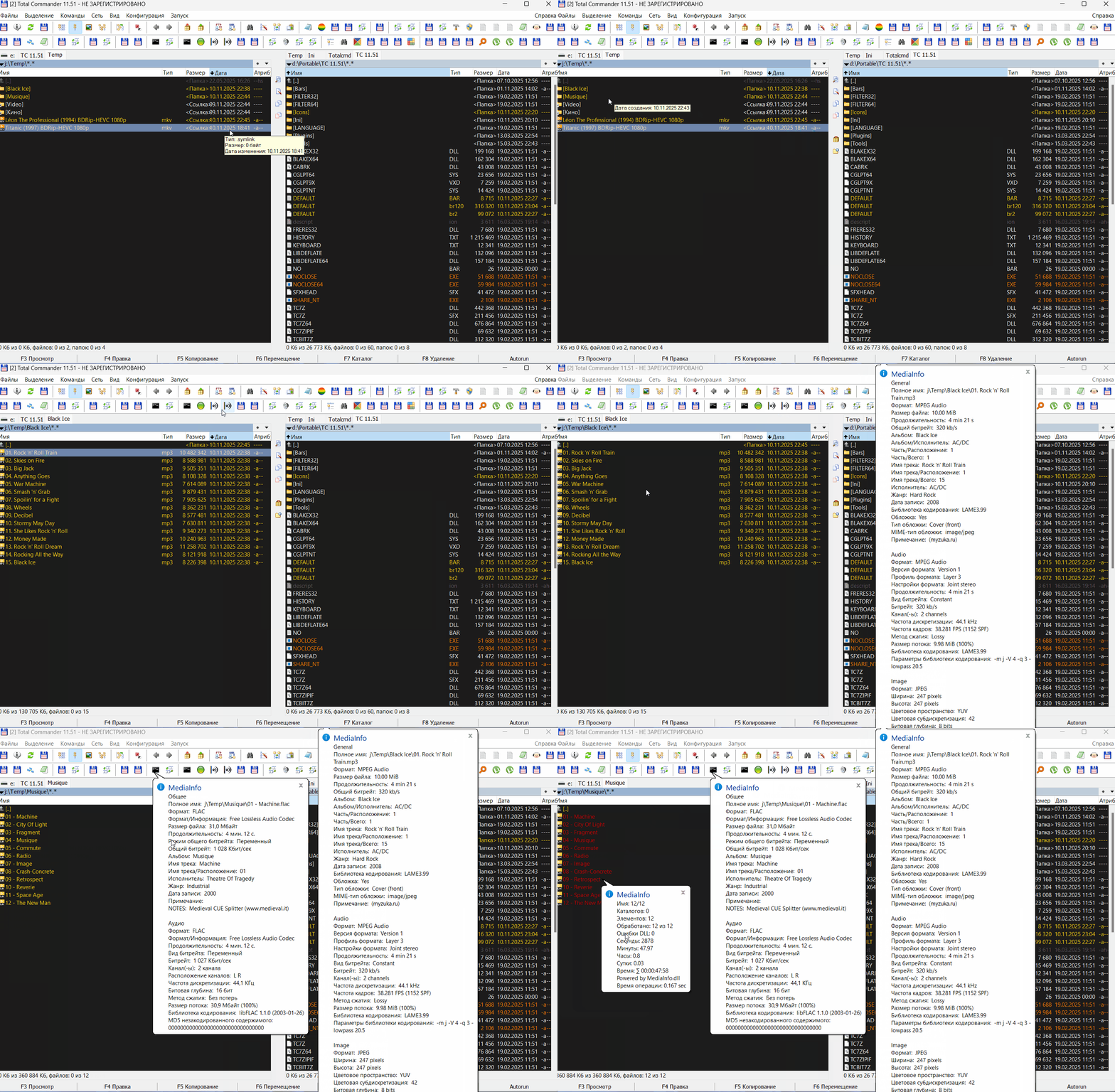
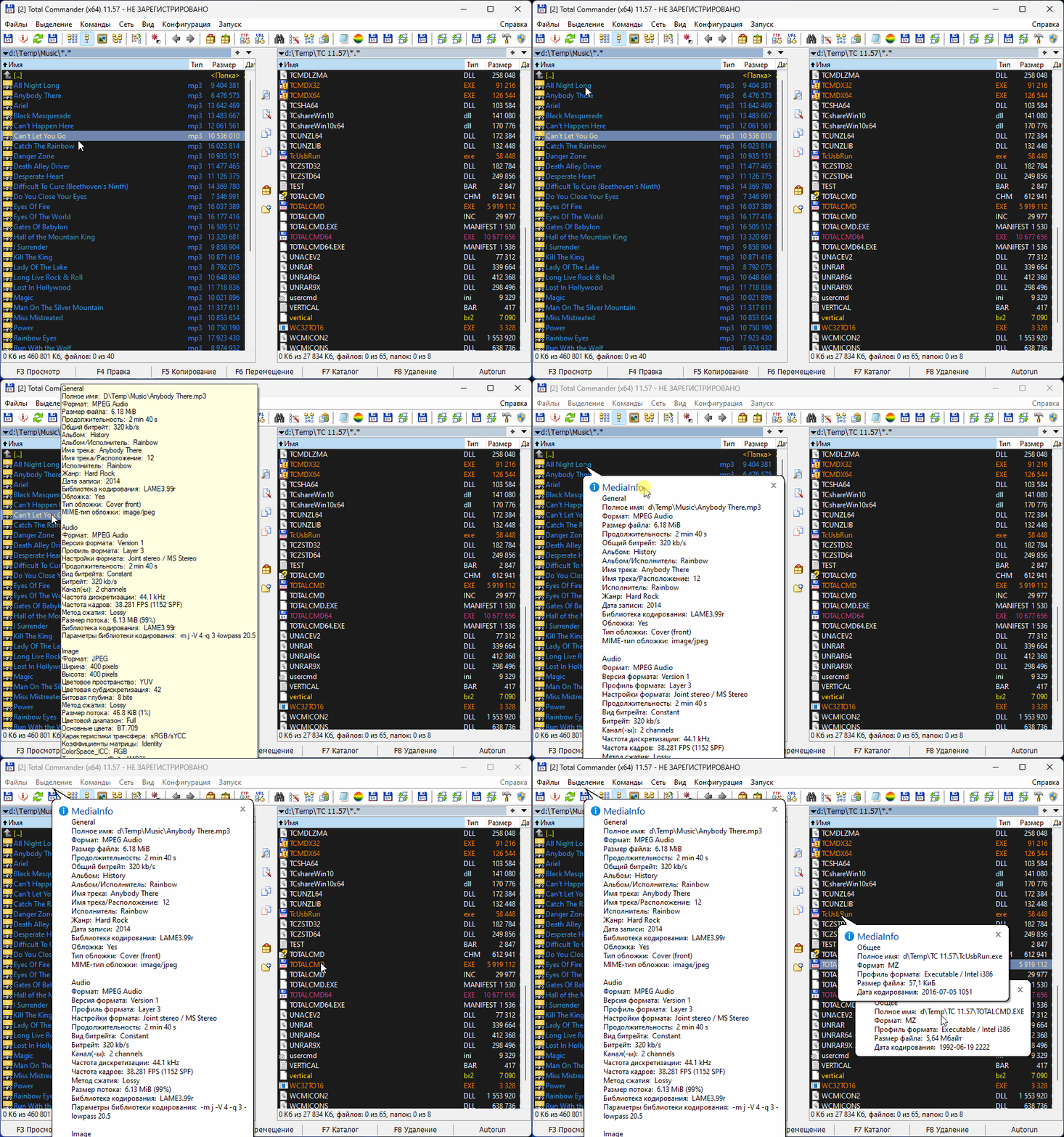
Pragma AutorunFinalizeSectionПанель делится на три области: в каждой области отображается своя подсказка. При удержании Shift в подсказке отображаются данные из плагинов, тем самым общее количество подсказок равно шести.
Алгоритм вывода данных из плагинов. В подсказку выводятся все непустые поля из плагинов указанных в файле WdxHint.cfg. Пример файла:
Код: Выделить всё
File.wdx;UnicodeTest.wdx;FileX.wdx
Permissions.wdx;NTLinks.wdx;NTFSFileStreams.wdx
anytag.wdx
Script.wdx;WinScriptsAdv.wdxКод: Выделить всё
Global gHintPipe     =   "", _
       gHintClipb    =   true, _
       gHintLines    =   60, _
       gHintWait     =   0, _
       gHintShift    =   "duration.txt", _
       gHintCaps     =   true

Global gHintWdx      =   0, _
       gHintWdxList  =   List(), _
       gHintWdxCfg   =   COMMANDER_PATH & "\Ini\WdxHint.cfg"

Global gHintLayout   =   List(10, 75, 15), _
       gHintContent  =   List("size.txt", "Inform", "hint.txt"), _
gHintSleep = List(0, 0, 0)[cut]gHintClipb - копировать в буфер всю подсказку при отображении в страничном режиме
gHintLines - число строк подсказки, больше 60 быть не может
gHintWait - задержка для всех секций перед отображением
gHintShift - шаблон для смены "на лету", только для левой секции
gHintCaps - если false, подсказка будет отображаться без CapsLock или Ctrl
gHintLayout - размер каждой секции в процентах
gHintContent - шаблон для каждой секции; если пустой "", в секцию ничего не попадает, кроме самой подсказки ТС или проводника; если "Inform" - стандартный отчет MediaInfo; если имя файла, то шаблон из файла (файлы должны находиться в каталоге MediaInfo.dll, существование файла не проверяется, в случае отсутствия сообщений об ошибке не будет, отобразится сырой результат отчета MediaInfo).
gHintSleep - задержка для каждой секции.
Пара примеров.
Код: Выделить всё
gHintCaps     =   false
gHintLayout   =   List(15, 70, 15)
gHintContent  =   List("Inform", "", "duration.txt")
gHintSleep = List(500, 0, 0)Код: Выделить всё
gHintCaps     =   true
gHintLayout   =   List(10, 80, 10)
gHintContent  =   List("size.txt", "hint.txt", "Inform")
gHintSleep = List(0, 0, 0)Дополнительно шаблон в левой секции может меняться "на лету" с тем, что указан в gHintShift. Комбинация для смены Alt+5.
Кроме Alt+5 действуют еще 4 комбинации: Alt+1..Alt+4. Каждая из этих комбинаций выводит одну страницу последней подсказки и опционально копирует ее в буфер. Такое применение удобно на очень больших подсказках, которые обрезаются на 60-и строках, оставляя лишь одну страницу для просмотра. Нажав Alt+2 можно переместиться на вторую страницу и так далее. Всего четыре страницы.[/cut]
В подсказке используются шаблоны MediaInfo: текстовые файлы с собственной разметкой и синтаксисом. Изменяя эти файлы, можно подстраивать под себя данные, которые выводятся из MediaInfo.dll. Сейчас используются три шаблона hint.txt, size.txt и duration.txt, можно создать другие или полностью передлать эти.
[cut="hint.txt"]General;"Name: %FileName%.%FileExtension%\nSize: %FileSize/String4%\n[Duration: %Duration%]\n[Duration: %Duration/String1%]\n[Duration: %Duration/String5%]\n
[General: %BitRate/String%][(%BitRate_Mode%)][, %Format%]$if(%Cover%,\, Cover)$if(%IsStreamable%,\, Streamable)[, %FrameRate/String%]"\n
Video;Video #%StreamKindID%: [%Width%x%Height%][, %Format%][(%Format/Family%)][, %Language%][, %AspectRatio/String% (%AspectRatio%)][, %Resolution/String%][, %FrameRate/String%][, %BitRate/String%][(%BitRate_Mode%)]\n
Video_Begin;
Video_Middle;
Video_End;\n
Audio;Audio #%StreamKindID%: [%Channel(s)%ch][, %SamplingRate/String%][, %BitRate/String%][ (%BitRate_Mode%)][, %Format%][, %Format_Profile%][, %Language%][, %FrameRate/String%]\n
Audio_Begin;
Audio_Middle;
Audio_End;\n
Text;Text #%StreamKindID%: %Format%[, %Language/String3%][, %StreamSize/String3%][, %BitRate/String%][, %FrameRate/String%][, %SamplingRate/String%]\n
Text_End;\n
Chapters;Chapters #%StreamKindID%: %Total% chapters\n
Image;Image #%StreamKindID%: [%Width%x%Height%pix][, %Format%][, %StreamSize/String5%][, %ColorSpace% (%ChromaSubsampling%)][, %BitDepth/String%][, %ColorSpace_ICC%]\n
Menu;Menu #%StreamKindID%: [%MenuID/String%][, Format:%Format/String%][ Chapters: \[%Chapters_Pos_Begin%-%Chapters_Pos_End%\]][/cut]
[cut="size.txt"]General;Name: %FileName%.%FileExtension%\r\nSize: %FileSize/String4%\r\nGeneral: [%StreamSize/String%]\r\n
Video;Video #%StreamKindID%: [%StreamSize/String%]\r\n
Audio;Audio #%StreamKindID%: %StreamSize/String%[ - %Language/String%][ | %Title%]\r\n[/cut]
[cut="duration.txt"]General;Name: %FileName%.%FileExtension%\r\nSize: %FileSize/String4%\r\nGeneral:\r\n [Duration: %Duration%]\r\n [Duration: %Duration/String1%]\r\n [Duration: %Duration/String5%]\r\n
Video;Video #%StreamKindID%: \r\n [Duration: %Duration%]\r\n [Duration: %Duration/String1%]\r\n [Duration: %Duration/String5%]\r\n
Audio;Audio #%StreamKindID%: \r\n [Duration: %Duration%]\r\n [Duration: %Duration/String1%]\r\n [Duration: %Duration/String5%]\r\n[/cut]
Шаблоны должны находиться в каталоге библиотеки.
Также в файле autorun.cfg самой первой строкой должны быть прописаны поля подсказки:
Код: Выделить всё
Pragma AutorunPluginFields "C1:::MediaHint" "C2:::MediaHint" "C3:::MediaHint" "C4:::MediaHint" "C5:::MediaHint" "C6:::MediaHint" "C7:::MediaHint" "C8:::MediaHint" "C9:::MediaHint" "C10:::MediaHint" "C11:::MediaHint" "C12:::MediaHint" "C13:::MediaHint" "C14:::MediaHint" "C15:::MediaHint" "C16:::MediaHint" "C17:::MediaHint" "C18:::MediaHint" "C19:::MediaHint" "C20:::MediaHint" "C21:::MediaHint" "C22:::MediaHint" "C23:::MediaHint" "C24:::MediaHint" "C25:::MediaHint" "C26:::MediaHint" "C27:::MediaHint" "C28:::MediaHint" "C29:::MediaHint" "C30:::MediaHint" "C31:::MediaHint" "C32:::MediaHint" "C33:::MediaHint" "C34:::MediaHint" "C35:::MediaHint" "C36:::MediaHint" "C37:::MediaHint" "C38:::MediaHint" "C39:::MediaHint" "C40:::MediaHint" "C41:::MediaHint" "C42:::MediaHint" "C43:::MediaHint" "C44:::MediaHint" "C45:::MediaHint" "C46:::MediaHint" "C47:::MediaHint" "C48:::MediaHint" "C49:::MediaHint" "C50:::MediaHint" "C51:::MediaHint" "C52:::MediaHint" "C53:::MediaHint" "C55:::MediaHint" "C55:::MediaHint" "C56:::MediaHint" "C57:::MediaHint" "C58:::MediaHint" "C59:::MediaHint" "C60:::MediaHint"Возможные сценарии.
1) Если в секции нет других расширений, достаточно просто применить готовый вариант:
[cut][HintsCustomField]
0exts=*.*
0fields=[=autorun.C1]\n[=autorun.C2]\n[=autorun.C3]\n[=autorun.C4]\n[=autorun.C5]\n[=autorun.C6]\n[=autorun.C7]\n[=autorun.C8]\n[=autorun.C9]\n[=autorun.C10]\n[=autorun.C11]\n[=autorun.C12]\n[=autorun.C13]\n[=autorun.C14]\n[=autorun.C15]\n[=autorun.C16]\n[=autorun.C17]\n[=autorun.C18]\n[=autorun.C19]\n[=autorun.C20]\n[=autorun.C21]\n[=autorun.C22]\n[=autorun.C23]\n[=autorun.C24]\n[=autorun.C25]\n[=autorun.C26]\n[=autorun.C27]\n[=autorun.C28]\n[=autorun.C29]\n[=autorun.C30]
1exts=*.*
1fields=[=autorun.C31]\n[=autorun.C32]\n[=autorun.C33]\n[=autorun.C34]\n[=autorun.C35]\n[=autorun.C36]\n[=autorun.C37]\n[=autorun.C38]\n[=autorun.C39]\n[=autorun.C40]\n[=autorun.C41]\n[=autorun.C42]\n[=autorun.C43]\n[=autorun.C44]\n[=autorun.C45]\n[=autorun.C46]\n[=autorun.C47]\n[=autorun.C48]\n[=autorun.C49]\n[=autorun.C50]\n[=autorun.C51]\n[=autorun.C52]\n[=autorun.C53]\n[=autorun.C54]\n[=autorun.C55]\n[=autorun.C56]\n[=autorun.C57]\n[=autorun.C58]\n[=autorun.C59]\n[=autorun.C60][/cut]
2) Если в секции есть другие шаблоны и маски, нужно добавить по последнему номеру, например:
[cut]
Код: Выделить всё
[HintsCustomField]
0exts=>NTFS Ссылка
0fields=[=ntlinks.Obj_Type]\n[=ntlinks.Obj_RealPath.Natural]
1exts=*.apk
1fields=Название: [=apk.Application Name ru]\nВерсия: [=apk.Version] ([=apk.Version Code])\nПакет: [=apk.Package]\nAndroid: [=apk.Min SDK Name]
2exts=*.aucfg; autorun.cfg;*.ini;*.ahk; ;*.au3; *.vbs; *.bat; *.ps1
2fields=Число строк: [=linebreakinfo.CRLF Count]\nБайт прочитано: [=linebreakinfo.Bytes Read]Код: Выделить всё
[HintsCustomField]
0exts=>NTFS Ссылка
0fields=[=ntlinks.Obj_Type]\n[=ntlinks.Obj_RealPath.Natural]
1exts=*.apk
1fields=Название: [=apk.Application Name ru]\nВерсия: [=apk.Version] ([=apk.Version Code])\nПакет: [=apk.Package]\nAndroid: [=apk.Min SDK Name]
2exts=*.aucfg; autorun.cfg;*.ini;*.ahk; ;*.au3; *.vbs; *.bat; *.ps1
2fields=Число строк: [=linebreakinfo.CRLF Count]\nБайт прочитано: [=linebreakinfo.Bytes Read]
3exts=*.*
3fields=[=autorun.C1]\n[=autorun.C2]\n[=autorun.C3]\n[=autorun.C4]\n[=autorun.C5]\n[=autorun.C6]\n[=autorun.C7]\n[=autorun.C8]\n[=autorun.C9]\n[=autorun.C10]\n[=autorun.C11]\n[=autorun.C12]\n[=autorun.C13]\n[=autorun.C14]\n[=autorun.C15]\n[=autorun.C16]\n[=autorun.C17]\n[=autorun.C18]\n[=autorun.C19]\n[=autorun.C20]\n[=autorun.C21]\n[=autorun.C22]\n[=autorun.C23]\n[=autorun.C24]\n[=autorun.C25]\n[=autorun.C26]\n[=autorun.C27]\n[=autorun.C28]\n[=autorun.C29]\n[=autorun.C30]
4exts=*.*
4fields=[=autorun.C31]\n[=autorun.C32]\n[=autorun.C33]\n[=autorun.C34]\n[=autorun.C35]\n[=autorun.C36]\n[=autorun.C37]\n[=autorun.C38]\n[=autorun.C39]\n[=autorun.C40]\n[=autorun.C41]\n[=autorun.C42]\n[=autorun.C43]\n[=autorun.C44]\n[=autorun.C45]\n[=autorun.C46]\n[=autorun.C47]\n[=autorun.C48]\n[=autorun.C49]\n[=autorun.C50]\n[=autorun.C51]\n[=autorun.C52]\n[=autorun.C53]\n[=autorun.C54]\n[=autorun.C55]\n[=autorun.C56]\n[=autorun.C57]\n[=autorun.C58]\n[=autorun.C59]\n[=autorun.C60]После добавления полей в секции, нужно зайти в диалог Настройки -> Содержимое панелей -> Пользовательские и поставить галочку "Объединять все подсказки, подходящие по типу файлов".
После перезапуска подсказка должна отображаться на панелях при наведении курсора мыши на нужный файл с удержанием CTRL или включеном CapsLock. CTRL работает только в 32-битной версии ТС из-за ограничений самого ТС.
По умолчанию панели делится на 3 части: 10% справа, 75% центр, 15% слева. В каждой области отображается своя подсказка из MediaInfo.dll. Удержание Shift переключает отображение на плагины. Поскольку Shift не работает в TCx64, как и CTRL, переключением доступно только через Win+CapsLock. Данная комбинация работает и в TCx32.